Showing posts with label Information Technologies. Show all posts

Wednesday, 13 May 2009

Posters up to 20 meters ...

This post talks about how to create giant posters at home. Here are a few computer programs and websites.

It's free, you only need the software and about 5-10 minutes (without taking into account printing and placing it on the wall).

Steps to follow:

1. Download the program or use the web aplication

http://homokaasu.org/rasterbator/) .Note that the web version has more restrictions and the size and resolution will be lower.

2. Run Rasterbator and select the image

3. Select the paper size and alignment (A4, A3 etc) (horizontal or vertical).

4. Set the output size: (see the poster of the photo).

5. Set the desired options in “rasterbation”: color and resolution

6. Select the output directory and press' Rasterbate!

7. Finished: Print it and place it on the wall.

Ronyasoft offers ProPoster a non-free software to make posters at home.

Steps to follow:

1.Download program at

http://www.ronyasoft.com or http://www.ronyasoft.com/products/proposter/files/proposter.zip

2. Pay to use the program and register it.

3.Select image and size.

4. Print the images.

Block posters is a free website

pplication, here you can upload your photo and print it like a giant poster.

Steps to follow:

1. Upload your photo in the webpage.

2. Modify the image

3. Print the images.

Only 3 steps!

With Poster 8 you can make super banners, signs, certificates…

Steps to follow:

1-Download the software at

www.postersw.com

2-Purchase it and register Poster 8.

3-Only 60 seconds to make your image.

4-Print and hang on the wall.

In my opinion, the best choice is Rasterbator because it has many options and editing tools and it’s free.

Wednesday, 22 April 2009

Poll Creator

Why not vote about whatever we want? Now you can with: www.MyPollCreator.com, It's easy, free and you don't have to spend a lot of time on creating HTML code, they do it for you! Just register on the website and start making the poll.
Would you like to have polls in the blog?
Yes, they are really usefull No, they are totally useless I don\'t really care What is a poll?
Results

Tuesday, 14 April 2009

Second Life

Second life is a game created by Linden Lab on 2006.

It’s supposed to be a simulator of life, but more based on social life.

The game is based on the sci-fi novel ‘Snow Crash’ by Neal Stephenson and on Cyberpunk.

It works with a 3d avatar system, that is based on creating your own character and moving on a 3d world.

As it is a simulator of life, you also have to buy or sell things, and it has its own currency, the Linden Dollar (L$). You start with a quantity of L$’s and if you want to get more you’ll have to exchange them by real money by PayPal.

You can see movies, called machinimas and some bands ‘played’ on the game, like U2.

And also political life! Gaspar Llamazares from Spanish ‘Izquierda Unida’ joint the game and they have an office inside the game and some other.

There are communities created for countries so you can find Spanish community and Polish community. The Spanish community in second life is the 85% of the total population of the game.

So Second Life is a perfect representation of life.

Steps
  • First of all you have to go to Second Life’s website (http://secondlife.com/)
  • Then click on Get Started (top right)
  • Next you have to fill all the spaces that they tell you.
  • To get a trial / demo of the game you have to be over 18 or pay directly

· When you fill all the spaces,

accept the terms of service agreement, and click on Create Account.

  • You will get an email, which you don’t have to reply, with a link, when you click on the link you will activate your account.
  • Then directly you will be sent to the download section.
  • When you download th e game, install it and you will be able to play!

Moodle

Moodle was created by Martin Dougiamas, a WebCT administrator at Curtin University, Australia, who was graduate degrees in Computer Science and Education.

Moodle is a free and open source, e-learning software platform, also known as a Course Management System, Learning Management System, or Virtual Learning Enviroment.

Moodle is designed to help educators create online courses with opportunities for rich interaction. Its open source license and modular design means that people can develp additional functionality.

Moodle has many features expected from an e-learning platform, plus some original innovations.

Moodle is modular in construction and can readily be extended by creating pluguins for specific funtionality. Moodle's infrastucture supports many types of pluguins.

  • Activities
  • Resource types
  • Question types
  • Data field types
  • Graphical themes
  • Authentication methods
  • Enrollment methods
  • Content Filtres

Windows Movie Maker

Windows Movie Maker

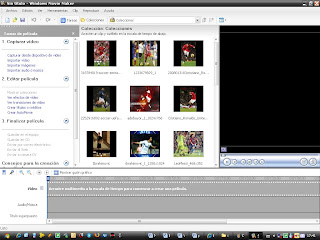
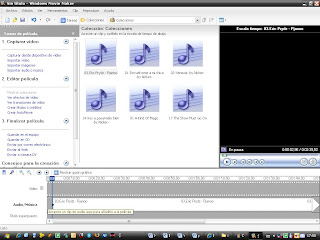
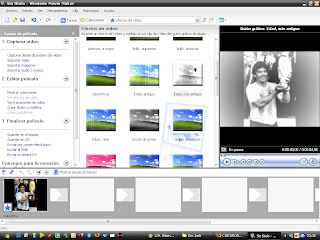
Windows Movie Maker is a video editor that we can edit videos and create image and audio video, use effects and distortions. It’s easy to use, here we add instructions.

Photo Video

1_Import images at Movie Maker.

2_Import songs and audio.

3_Insert effects and transitions

4_Save and choose format.

Wednesday, 1 April 2009

Adobe Photoshop

Research Project ADOBE PHOTOSHOP©

· ADOBE PHOTOSHOP
It is a graphics editing program developed and published by Adobe Systems. It is the current and primary market leader for commercial bitmap and image manipulation, and it is the flagship product of Adobe Systems. With this program we can manipulated images, mix photos, change their characteristics, change their format, etc…

TO PRACTICE! TECHNIQUE OF THE SELECTION

Some tools are easy but others are difficult. The tools that are easy to use are the "magic wand" or the "lasso" but the results aren’t precise. The one that has precision but it is difficult to work with, is the tool "pen".We use this technique for different effects.

PRATICE

A way to isolate an element of an image and to maintain the details of its edges is to use the filter “To extract”. The most important tools are: the highlighter and the paint bucket.

1. An image is chosen, we open it and we work with the version Marinates Photoshop CS3. Next, we go to Menu>Filter>“To Extract”. We open the window of the tool and we see the different possibilities of configuration of the tool brush on the right.

2. Now we define the thickness the brush with which we will draw up the outline. Next we go to the image and we drew up the part that we want to select. When we have already drawn the line of the wished image, we take the paint bucket and click on the selection.

3. We click the Preview button (right superior part of the screen). Now we observe the silhouette image surrounded by grey pictures (transparency), to see better the detail of the outline chooses in the menu of configuration of Preview (right part inferior) that the bottom is white or black.

4. Of this form you visualized the existence of I haul target or black. In this case it leaves I haul black, that makes difficult to integrate the image on a bottom of clear tones. In order to eliminate it and to correct it accounts with the tool To alter edges and “To clean” (left part superior) that purify the selection.

5. When you have cleared the halos presses OK, you will have the selected image isolated del bottom, single would be to integrate it al bottom that you wish. For this it unfolds the “To Edit”>Copy menu, - or the short cut of keyboard ctrl+c, opens the image that you are going to use of bottom and presses ctrl.+v - short cut of “To Edit>Paste.

In summary...

1. Open the image in Photoshop CS3>Filter> To extract

2. Brush> To define thickness...pixels> To isolate object

3. Preview>Menu preview configuration.

4. Depure the selection>Retouch and clean.

5. OK>Menu edit>Copy>Open the image of the bottom>Menu edit>Paste.

Wednesday, 4 February 2009

MareNostrum

MARENOSTRUM

MareNostrum is the name of Spain's most powerful supercomputer according to the TOP500 list. His best position was the fifth such list was reached in November 2006. It is currently located at position number 40 of the world ranking as the newspaper La Vanguardia of 30th November, 2008. This is because in the past two years has not bee the system architecture. Was launched on April 12, 2005 filed by the company IBM and the Spanish Minister of Education and Science Maria Jesus San Segundo. Since then it is used in human genome research, the structure of proteins and in designing new drugs, among others. Its use is available for national and international scientific community, controlled by a committee assignment that assigns computation time depending on the value of projects to do.

Mare Nostrum ( "our sea" in Latin) is the name the Romans used to appoint the Mediterranean Sea. He was chosen not only by the place but also to represent the vast computing power of this resource.